Playground vs Launchpad
Choose the team Playground when exploring a format, or the brand home when the brand is already set.
There are two main ways to start a full ad. Both spend team credits and both store the finished ad on a brand. The difference is whether you already know which brand owns the work.
Quick chooser
| Start here | Use it when | What happens |
|---|---|---|
| Brand home | The brand exists and you want the result stored there | Write a brief in Describe the ad you want, or pick a card under Or start from a format. Static, Rich media, and Carousel open their studio with the brand already filled in. Campaign opens the brand's Campaigns, and Video opens a chooser of video types |
| Brand sidebar libraries | You are already in the brand | That format's library, plus a generate button that opens the same studio |
| Team Playground tiles | You are exploring a format and will attach or create a brand during the flow | Search a business (or pick a saved brand), configure, generate |
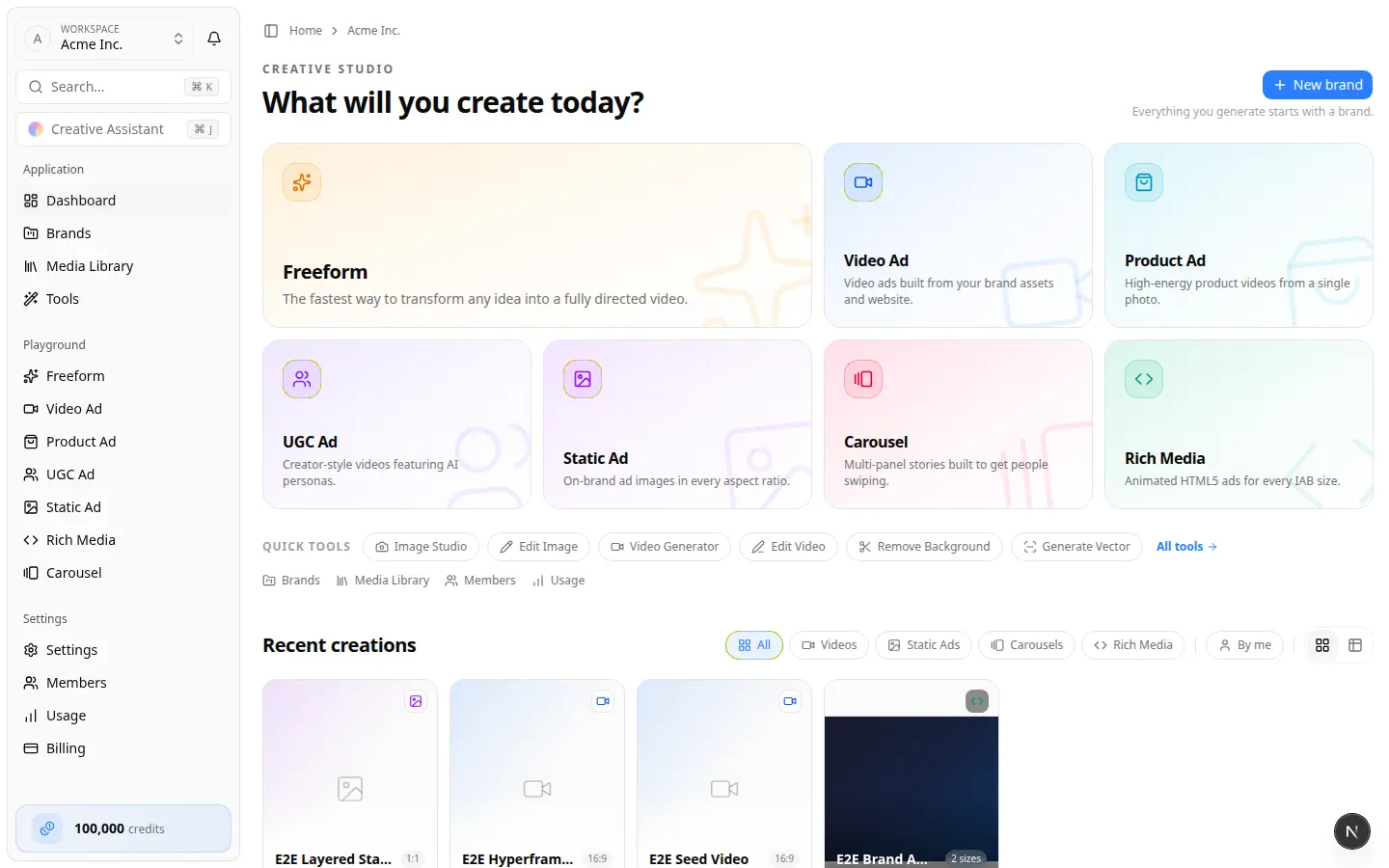
Playgrounds live on the team home (Creative studio — What will you create today?). The brand home lives on /home/brands/{brandId}.
Team Playground tiles
On the team home you will see tiles such as:
- Freeform — open-ended directed video
- Video Ad — brand-website video ads → Video Playground
- Product Ad — short product videos from photos → Create product ads
- UGC Ad — creator-style product videos → Create UGC ads and personas
- Static Ad — still ads in many sizes → Static Ad Playground
- Carousel / Rich Media — Create carousel ads and Create rich media ads
Video, Static, Carousel, and Rich Media playgrounds share one start screen: Which business is this ad for? Your brands lists brands you already saved. A matching website offers Use your saved brand "{name}" (Already saved). Otherwise pick a Google place, or Add "{name}" as a new business. After that, a Generation Studio opens: brand header, Creative direction (plus creative concept), and Output settings on one page — no Configuration / Content tabs. Open Brand options to choose an existing brand or create a new one.
Product Ad and UGC Ad skip the business search. Each opens its own studio with Select Brand at the top, two columns, and shape and length on the right. Product Ad's columns are Product and Ad type (plus Direction, and a cast member when the type is Catalyst). UGC puts Who’s on camera? beside the brand (Choose a brand first); the columns are Product shots and Script and delivery. Both generate on the page and can open the video editor from there.
Brand home formats
Above the cards, Describe the ad you want can generate from a brief. Under Or start from a format, each card opens a brand-scoped destination:
| Card | Opens |
|---|---|
| Campaign | The brand's Campaigns |
| Static | The brand's Static Ad Generation Studio |
| Rich media | The brand's Rich Media Generation Studio |
| Video | What kind of video? — Standard, UGC, Hypermotion, Catalyst, and Metaphor |
| Carousel | The brand's Carousel Ad Generation Studio |
Personas (including Create UGC video) is on the right rail and in the sidebar, not a format card. Confirm the brand name in the header before you generate. See Work in a brand.
Same result, different front door
| Format | Brand path | Team playground | Where it lands |
|---|---|---|---|
| Video | Video card → Standard, or sidebar Video Ads → Generate Video | Video Ad tile | Brand Video Ads + video editor |
| Static | Static card, or sidebar Static Ads → Generate Static Ads | Static Ad tile | Brand Static Ads |
| Rich Media | Rich media card, or sidebar Rich Media → Generate New | Rich Media tile | Brand Rich Media |
| Carousel | Carousel card, or sidebar Carousels → New Carousel | Carousel tile | Brand Carousels |
| Product Ad | Video card → Hypermotion, Catalyst, or Metaphor | Product Ad tile | Studio, then the brand video editor and Video Ads |
| UGC | Video card → UGC, or Personas → Create UGC video | UGC Ad tile | Video editor (chooser or playground) or Personas UGC Videos (persona path) |
Leaving a playground resets the form when you return — each visit is a new transaction.
Not playgrounds
Team Tools (Image Studio, Video Generator, Adapt Ad, and so on) create or transform assets, not full multi-scene ads. See Tools.